
Cybersecurity warnings are everywhere today. You can’t turn on the T.V. without hearing about the latest ransomware attack which leaves a business facing a massive pay out to regain access to their data. Your employer is sending you regular email tests to make sure you aren’t “clicking the dangerous link”. Or your credit card company is sending you their latest security breach notice telling you that your account information has been somehow compromised.
What are all these warnings telling us and why is it so important?
It is critical to understand that technology tools alone will not protect individuals or businesses against every threat. Criminals go where security is the weakest, which is people. Think about it – we now live in a world where we transmit the most protected details of our identity electronically. We pay for things electronically. We walk around with a device in our pocket which contains our most private information. Our personal details are ripe for the picking, and it is a lucrative business for criminals.
The average cost of a business data breach has reached a record high of $4.45 million according to the 2023 cost of a data breach report by IBM and the Ponemon Institute. The FBI’s Internet Crime Complaint Center received 3,729 complaints about ransomware attacks in 2021. Those attacks accounted for financial losses of $49.2 million, and the numbers are expected to continue to climb.
Cyber crime is social engineering, and social engineering is about distraction and misdirection. Scammers are trying to trick you into giving up the most private details about your identity, so they can then use that information for their financial gain. They are doing this through their phishing efforts.
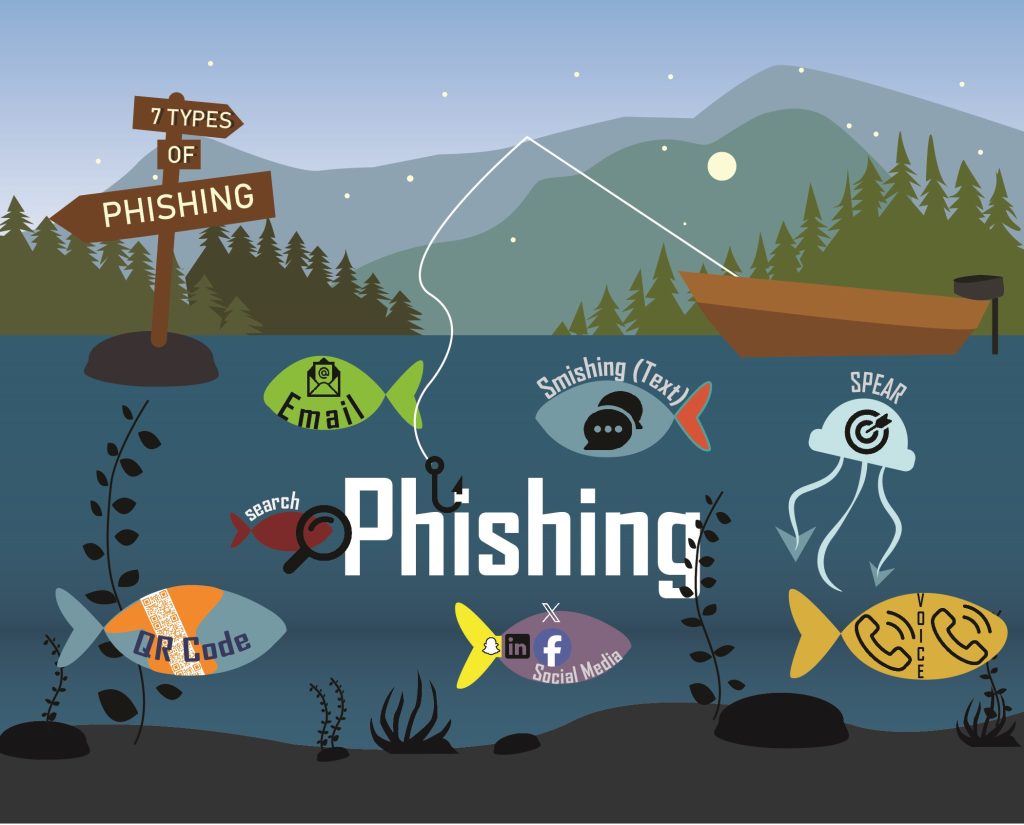
Here are the seven types of phishing scams you need to know about.
- Email Phishing Scams are designed to look like a legitimate email from your bank, from PayPal, from Google, from Amazon and even from a legitimate customer. The phishing email attempts to illicit an immediate response from you based on a manufactured sense of fear.
- Spear Phishing Scams occur when hackers target you specifically. The hacker has researched you – they may know your family members, where you work and who your boss is. With that type of personal information, the chances of a hacker fooling you are much higher because they can build in familiarity into their phishing attempt.
- Smishing Scams are also known as text message phishing scams. We respond to text and instant messages faster than email and criminals know this. They are embedding their phishing links to fraudulent websites directly into their text messages.
- Some of the top search results in search engines are phishing links, a phenomenon known as Search Engine Phishing. Scammers invest in search engine optimization (SEO) just like business do and they work hard to rank their scam sites in the top search results. One errant click on a high-ranking fraudulent search engine result can be as disastrous as clicking on a link embedded in a phishing email.

- Social media is full of fake accounts and is full of social media scams. Be warry of a fake account with the same name and photo as one of your real friends – oftentimes it is a criminal who will later try to scam you.
- Who thought a QR code would be dangerous? They are everywhere, especially in restaurants following the pandemic. Did you know that criminals will place their own sticker over the legitimate QR code? As soon as you scan it, you are redirected to a fake site.
- Voice Phishing (also known as “vishing”) is a type of phishing attack made over the telephone. Scammers spoof phone numbers to look identical to a known number, like your bank or credit card company in order to trick you into giving them information.
It is critical that everyone understands what protected information is. Your personal data including social security numbers, credit card information, bank account information, date of birth, driver license number, passport number, street address, phone numbers, and even biometric data can be considered protected information and should be treated that way. For example, your name alone may not be protected information, but your name, your credit card number and your zip code combined are definitely protected information and should be safeguarded.
Many banking sites now require the use of multi-factor authentication. While frustrating, multi-factor authentication is an added layer of security designed to prove that you are who you say you are. Multi-factor authentication may be a code texted to you by your bank before you can log into their website or a phone call you receive from your credit card company before a large purchase is processed on your card.
It is not uncommon for households to have multiple computer devices shared across multiple people. If you are sharing your personal device with multiple people, everyone should have their own log in account on the device. That way, if one person experiences a breach, the likelihood of everyone else using the device experiencing a breach lessens.
What about your old printer/scanner/copier units? Those units have memory in them – just like computer memory – which needs to be wiped clean before you dispose of those devices. If you don’t wipe the memory clean you stand a very good chance of a criminal getting their hands on that device and mining your personal data from the unit for use in their criminal enterprise.
Do you have encryption protection on your email? With 92% of all malware being distributed via email it is critical to understand email encryption and to ensure the email system you are using does offer encryption protection. Services such as Google’s Gmail do have TLS encryption, but it only offers protection if the recipient also has the same TLS encryption on their side.
Although the ways that criminals attempt to deploy ransomware are numerous, there are also numerous ways you can protect yourself from becoming a victim of ransomware. Never download files from unknown websites. Beware of phishing emails with any type of attachments. Don’t use your business email for personal business and don’t use your personal email for business purposes. All of these steps can help you avoid getting unwittingly hit with ransomware.
Public charging stations offering USB charging capabilities are everywhere, but users need to be alert as those public stations may be compromised. Likewise, be suspicious of public Wi-Fi. If you have the option to use your mobile data plan’s hotspot, that is safer than public Wi-Fi. Criminals often set up hotspots with fake Wi-Fi names, so always ask for the official Wi-Fi name.
Protecting yourself from becoming the victim of a cyber-attack requires diligence and an understanding of exactly what information hackers are looking for and how they go about getting that information. Following these simple steps could be the difference in whether or not your personal information is sold on the dark web to the highest bidder.

Article written by:
Stacey L. Axtell
Chief Administrator Officier
E: saxtell@hhk.com
Stacey Axtell is the Chief Administrative Officer with Hinman, Howard & Kattell, LLP.
As Chief Administrative Officer, Stacey’s responsibilities include strategic planning, recruiting and employee retention, facilities management, special project management, marketing, human resources, benefits management and cyber-security. Stacey is relied upon by law firm management to successfully select, train and lead the non-attorney staff of 120+ employees working in 14 offices in five states.
As Stacey’s duties have evolved with the growth of the law firm, she has undertaken day to day oversight of the Technical Support Department. She is intimately involved in firm cyber-security planning and response practices including training of the staff and attorneys, drafting and updating cyber-security policies and directing breach response planning strategies. Stacey has worked with the firm’s Director of Technology to manage significant IT infrastructure upgrades and cyber security enhancements.